As vehicle interiors become increasingly touchscreen-focused, the role of well-designed physical controls is becoming a growing topic of discussion across the automotive industry.
In this article, Michael A. Nees, Professor and Director of the Human factors, perception, and cognition at Lafayette College explores why the climate control switches in his Kia K4 stand out as an example of intuitive, driver-focused design, and what they reveal about the importance of ergonomics and tactile interaction in modern vehicle cabins.

Written by:
Michael A. Nees,
Professor and Director of the Human Factors, Perception, and Cognition Lab

Last summer I traded in my trusted but aging 2011 Toyota Corolla (only 69K original miles!) for a 2025 Kia K4 GTline. (Disclosure: I have no connections to Hyundai/Kia except for owning two of their cars.) I was drawn to the fact that, for a compact car at the low end of the price range, the K4 has attention to detail with respect to ergonomic design choices. Case in point: I love these climate control switches.
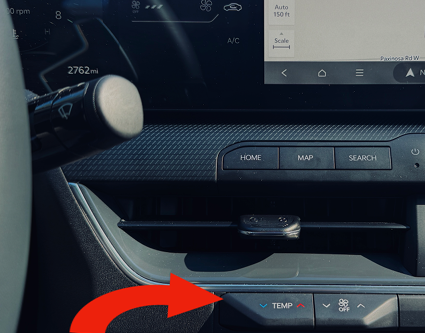
As you can see in the photo, the switches respectively control two things: the temperature setting and the fan setting. The switches rest in a neutral position unless they’re being activated. Tap up from underneath and you’ve either increased the temperature by one degree or the fan setting by one level. Tapping down from above decreases each setting by one unit. Turning the fan down to zero turns the climate system off. Flip the same switch back up to reactivate the climate controls and return the fan to level one.
Why do I love these switches? Because they reflect the implementation of several principles of good design derived from human factors and engineering psychology research.
● Location: Climate controls usually are placed on the center console, so they’re where the driver expects them to be located. Still, the K4 switches are located slightly higher up than many climate controls, which puts them closer to the driver’s line of sight with the roadway. This reduces glance time which increases safety. The placement just under the vent is also meaningful. When possible, switches should be in close proximity to the things that they control. Also notice that there are no other switches nearby. This location is where you reach to adjust the climate controls and only the climate controls.
● Size: the flaps on these switches are chunky. Fitts’s Law predicts that the bigger the
target, the easier it is to locate. This means less time with attention spent trying to locate
the switches with our fingers.
● Distinct actions for operation: these are the only switches on the console that operate using this particular tap up/down technique, which helps to further eliminate potential confusion with other controls.
● Stimulus-response compatibility: tapping up results in an increase; tapping down results in a decrease. This intuitive relationship between what we see/feel/do and its consequences seems like common sense, but it’s not a given. Consider how many manufacturers mess up this mapping with windshield wiper controls. (The K4 got this right, as well. Moving the stalk upwards should increase wiper speeds, always, in this writer’s opinion.)
● Redundant feedback: beyond the feel–a firm stop as the up or down tap motion is completed–concurrent visual feedback occurs in two locations: momentarily on the main touchscreen (as text on the bottom of the screen) and continuously on the climate control touchscreen. There’s no mistaking that your action was registered, and I’ve noticed zero lag.
● Eyes-free: all of the above features lead to an user experience that effectively allows for eyes-free adjustment of these controls while driving.
● Aesthetics: these things look great as well–sleek, stream-lined, and integrated into the cabin rather than tacked on as an afterthought.
On the downside, I can’t say that I completely agree with the choice to bury the airflow mode selector (windshield defrost vs. front vents vs. footwell air flow) in the touchscreen. Couldn’t that have been a switch, too? Nevertheless, wow, what a nice set of switches.
If you want to geek out more about physical buttons and their role in a touchscreen world, join me at the tutorial “Downfall of the Touchscreen: Human Factors and the Comeback of Buttons, Knobs, and Switches” at InCabin USA 2026!
Interested in exterior vehicle sensing technology?
With a pass to InCabin USA, you’ll also get full access to our co-located sister event, AutoSens. Find out more here >>